ASCII graphics: how we draw a whole city with text characters
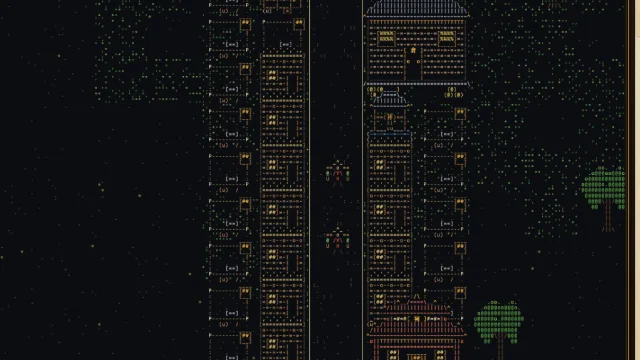
Every roof, tree, cart and lantern in Glyph Dynasty is made of text characters. Not a shader that turns a 3D scene into ASCII after the fact, but drawings typed by hand, character by character. This is how they become a living city with light, shadow and night.
A drawing is two lines of text
Each drawing in the game is a list of pairs of lines of equal width. The first line is the picture itself, the characters you would see in a text editor. The second is a colour map: one letter per character, pointing to an entry in the drawing’s palette that gives a colour for the glyph and a colour for its background. A space in the colour map means transparent; a space in the text under a colour means a filled background.
That is the whole format. A well with its roof and rope, a granary, the gate of a city wall: each is typed out like this, and a test checks every drawing for the right width and height before it can enter the game.
A grid of 16 by 8
A map tile is 16 characters wide and 8 tall, a 2:1 shape that fits a 3/4 view. A building that covers w×h tiles is exactly 16·w characters wide. Its bottom 8·h rows are its base, lying on its tiles; anything above, such as a roof, a flag or smoke, overhangs the tile behind it. That overhang is what gives a street depth: the roofs of one row partly cover the road behind them, just as in the classic isometric city builders. Why the grid grew to this size is told in from 10×5 to 16×8.
From text to light
The characters are drawn on a canvas with WebGL2. Every glyph that appears on screen goes into a texture atlas, and each frame is drawn from that atlas in one pass. The shader adds what plain text cannot have: a surface texture, volume, light and the shadows that buildings and walkers cast across the road. Where WebGL2 is missing, a plain Canvas renderer draws the same city more simply.
- Each character in the dense style is split into finer marks, so even small detail has texture
- Ground, roads and water are drawn once into a cached layer; only what moves is redrawn
- At night the windows, lanterns and fires glow, and lanterns light up in a wave at dusk
- Zoom out and a signboard melts into a spot of gold on lacquer; zoom in and its character is sharp
Real Chinese characters on the signboards
The signboards are where the text turns literal. Twenty-eight kinds of building carry real Chinese characters in the full forms used under the Qin and Han, gold on lacquer: 市 over the market, 倉 over the granary, 井 on the well, 廟 on the temple, 鹽鐵 on the Salt and Iron Office, 未央 over the Weiyang Palace. They come from a small font of only the characters the game needs, about 14 KB.
Why not just a filter
Converting a 3D render into ASCII is a well-known trick, and it gives a striking effect. But characters chosen by brightness are noise; characters chosen by a person are drawing. A row of tiles reads as tiles because someone typed it as tiles. Keeping the drawings as text also means the city can always be shown as text: hold the ` key for Show glyphs, or save a view as a .txt file.
And it stays light
Text is compact. Drawings are small, the font is small, and the low graphics setting falls back to the coarser 10×5 drawings and skips night and effects, which keeps the game playable on old laptops. You can see the rendering in motion in the clips, and the genre it comes from in games like Pharaoh and Caesar III.
Glyph Dynasty is coming to Steam for Windows, macOS and Linux. Watch the clips, follow the development history or open the press kit.