Capture mode, Show glyphs and a city you can save as a .txt file
Between 22 and 23 October 2026 Glyph Dynasty got three tools for people who like to look at their city as much as to build it: a capture mode for clean shots and video, a key that strips the city down to the bare characters it is drawn with, and a way to save any view as a real .txt file.
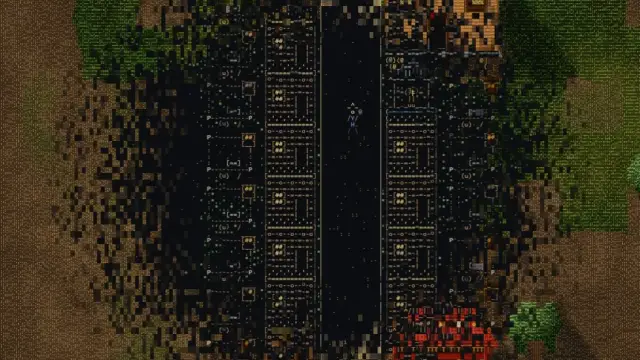
Capture mode: F10
Press F10 during a game and the interface disappears; only the city is left. The camera moves smoothly with the keys or the mouse, with inertia, and zooms freely around the cursor. Mark two camera views with 1 and 2, press F, and the camera glides from one to the other over a duration you choose, from one second to a minute.
- Time can run at ×1 to ×8 like in a normal game, or at ×16 and ×32 for time-lapses
- P saves a PNG at twice or four times the size of the screen
- R records a video straight from the map canvas
- Short messages and the red recording dot are not part of the frame, so they never end up in your shots
Show glyphs: the ` key
Hold the key to the left of 1 (` on an English keyboard) and the city falls apart into the plain characters it is drawn with: the same 16×8 text of every drawing, in a monospaced font. Release it and the city returns. The change runs as a wave from the cursor: light, texture and shadow fade, each character drops into place and flashes warm before cooling to its colour.
It works during a normal game and in capture mode, so the bare characters can go into a PNG or a video as they are. A setting chooses how they look: coloured characters on dark, or ink on paper. With reduced motion turned on in the system, the change is instant.
Save the city as a .txt file
Because the city really is text, it can be saved as text. In capture mode, T saves the middle of the view as plain ASCII sized for a forum post and copies it to the clipboard; Shift+T saves the whole view in full detail. The file is ordinary UTF-8 that any text editor opens.
Two small rules make it readable without colour. Road edges become -, | and +, and bare earth keeps only every third of its characters, since in the game a dull colour quiets it and in plain text a solid speckle would swallow the buildings. Each tile is 2:1 in characters, as in the game, so in a monospaced font the city is not squashed.
Why bother
A text-based game that hides its text would miss the point. These tools let you check that it really is characters all the way down, and they make sharing a city as easy as pasting it. Rain, snow and the Spring Festival lanterns go into capture mode as well. For the drawing technique itself, see how we draw a whole city with text characters; the other clips are on the home page.
Glyph Dynasty is coming to Steam for Windows, macOS and Linux. Watch the clips, follow the development history or open the press kit.